
Hunter Vault just got its biggest update yet. I shipped Smart Import — you point it at a bank statement, a CSV, a photo of a receipt, or a screenshot, and it pulls the transactions out for you so nothing slips through the cracks. And I added Huntee, an AI money advisor that lives inside the app and answers questions about your own spending.
To pay for the expensive parts, the release came with two new store products: a subscription called Hunter Pass and a consumable, AI credits, that powers the AI parsing and Huntee's replies.
Then Apple rejected the build. Then it rejected the next one. Then a third. Every rejection said more or less the same thing: reviewers couldn't locate the in-app purchases.
Here's the part that made me want to throw my laptop into the sea — the code was fine. Purchases worked on my device, in TestFlight, and in the sandbox. StoreKit wasn't the problem. The reviewer simply couldn't reach the screen where the purchases live, because they couldn't sign in. This is the whole story, and the specific fix that finally got it approved.
The short version
- Apple's rejection wasn't about broken billing. It was Guideline 2.1 – App Completeness: the reviewer couldn't find the products.
- A brand-new subscription or consumable has to be attached to and submitted with the app version on its first review, or the reviewer's build has nothing to validate against.
- The bigger issue for me was sign-in. My paywall sits behind a login, and the reviewer can't receive the one-time code your login texts to you.
- The fix that worked: a dedicated, throwaway demo account with two-factor turned off, dead-simple step-by-step notes, a screen recording of where the purchases are, and the IAPs correctly attached to the version.
- It got approved on the fourth submission. None of it required a single code change.
What I actually shipped
Two features, both leaning on AI, both new to the store.
Smart Import is the "never miss a transaction" feature. Manually typing in expenses is where every budgeting habit goes to die, so Smart Import takes the messy inputs people actually have — an exported bank CSV, a PDF statement, a receipt photo, a payment screenshot — and turns them into clean, categorized transactions in Hunter Vault. The parsing runs on AI, which costs money per import, which is why it's metered.
Huntee is an AI money advisor built into the app. Instead of a generic chatbot, it can reason over your actual Hunter Vault data — what you spent, where it went, what's recurring — and answer in plain language. That also costs money per message.
So the monetization has two shapes. Hunter Pass is the subscription for people who want ongoing access, and AI credits are a consumable for metered AI usage. If you've ever wondered why an app bothers with both a subscription and a consumable, this is exactly why — one is for access, the other is for usage that has a real per-action cost. Hunter Vault already runs its billing through RevenueCat, which is the same setup I described in turning a React web app into iOS and Android apps with Capacitor.
Why Apple kept saying it "couldn't find" the purchases
The rejection didn't come under a scary guideline. It came under the most common one there is. Apple's own note reads almost word for word: "We have started the review of your app, but we are not able to continue because we cannot locate the in-app purchases within your app at this time." That's Guideline 2.1 – App Completeness, and App Completeness is the single largest bucket of App Store rejections (Apple App Review Guidelines, retrieved Sep 11, 2026).
"Can't locate" is doing a lot of work in that sentence. It doesn't mean your billing is broken. It means the reviewer opened your app and never got to a place where the products appear. There are two ordinary reasons for that, and I managed to hit both.
Reason 1: the products weren't riding along with the version
The first time you submit a new subscription or consumable, it can't be reviewed on its own. It has to be attached to a new app version and submitted together with that build. Create the product in App Store Connect but forget to tick it onto the version you're submitting, and the reviewer's build has no products to load — StoreKit returns nothing, and from their side the purchases genuinely aren't there.
The mechanics of this trip people up constantly. If a build is stuck in review, the "In-App Purchases and Subscriptions" section can quietly disappear from the version page. The fix is to reject your own build so the version drops back to "Prepare for Submission," get at least one product to "Ready to Submit," then refresh the version page — the section reappears, and you can finally tick the products onto the submission.
Reason 2: the reviewer couldn't reach the paywall
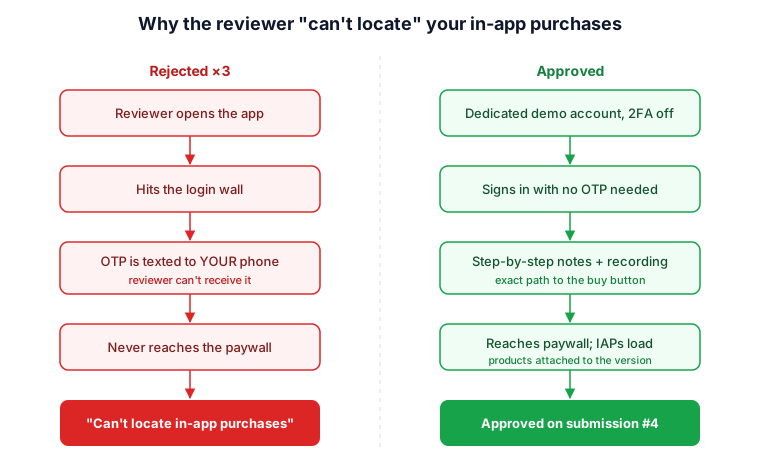
This was the real killer, and it had nothing to do with purchases at all. Hunter Vault's paywall sits behind a login. If the reviewer can't sign in, they never reach the screen where Hunter Pass and AI credits are offered — so of course they "can't locate" them. Apple is blunt about this in the guidelines: include demo account info if your app includes a login. No working account, no review.
I did provide a demo account. It still failed. And the reason it failed is the single most useful thing I learned from this whole ordeal.
The sign-in trap: your OTP goes to your phone, not theirs
I had login working through a Google account, with two-factor authentication switched on because that's the responsible default. When the reviewer tried to sign in, the login sent a one-time code — to my phone. The reviewer, sitting at a desk at Apple with no access to my number, had no way to get that code. So the sign-in stalled, they never reached the paywall, and the app came back rejected.
This is a well-known dead end. The reviewer's phone number can't be part of your demo account, so any login that depends on an SMS or authenticator code the account owner receives is a wall they can't climb. Two-factor is exactly the security feature that makes your real account safe and your demo account untestable.
Some teams solve this by standing up a little internal page that surfaces the latest login code for the test number so a reviewer can read it. That's clever, but it was far more engineering than a solo update deserved. I went the simpler route.
What finally got it approved
No code changed between the third rejection and the approval. Everything that worked happened in App Store Connect and in the review notes.
-
I created a dedicated demo account, used for nothing else. A fresh Google account made only for App Review, holding a bit of sample data and absolutely nothing personal, financial, or real. It is disposable by design.
-
I turned off two-factor on that one throwaway account. This is the move that mattered, and the important word is throwaway. With no OTP in the way, the reviewer could sign in with just the email and password in the notes. To be clear: I would never disable two-factor on a real user's account, my personal account, or anything touching production. This is a sacrificial account that exists only so a reviewer can get through the door.
-
I wrote steps a stranger could follow. No assumptions. Open the app, tap Sign in with Google, use this email and this password, tap the Import tab, tap Upgrade — Hunter Pass and AI credits appear here. Literal, numbered, boring on purpose.
-
I attached a screen recording. A short screen capture walking from the login screen straight to the purchase sheet, so even if a step in my notes was ambiguous, the reviewer could see exactly where the products live and that they load. This did more than any paragraph I wrote.
-
I double-checked the products were on the version. Both Hunter Pass and AI credits ticked onto the exact build I submitted, both in a submittable state, so there was something real for StoreKit to load once the reviewer arrived.
The next submission was approved. After three rejections, the thing that unblocked me was making it impossible for a reviewer to get lost.
The checklist I'd tape to my monitor before resubmitting
If Apple says it can't find your in-app purchases, walk this before you touch any code:
- Is every new product attached to the version you're submitting? First-time products only get reviewed when they ride along with a build.
- Are the products in a submittable state, not stranded in "Missing Metadata"?
- Does your app have a login? If yes, there is a working demo account in the App Review Information section.
- Can that account sign in with no code sent to your phone? If two-factor is on, the reviewer is stuck. Use a dedicated account with it off.
- Are your steps written for someone who has never seen the app? Name the exact buttons and the exact path to the paywall.
- Did you attach a screen recording from login to the purchase screen? It removes all doubt.
- Does the demo account hold zero real data? Treat it as sacrificial, never as a real user.
What I'd do differently next time
I'd assume from day one that a reviewer is a smart stranger with none of my context and none of my devices. Every rejection I got traced back to me quietly relying on something only I could do — receive my own OTP, know where my own paywall lives, remember which products belonged to which build.
I'd also stop treating review notes as an afterthought typed at midnight. For anything gated behind a login or a purchase, the demo account and the walkthrough recording are part of the submission, as much as the binary. If I'd shipped those with the very first build, I'd have saved about a week and a fair amount of dignity.
The features were the hard engineering. Getting a stranger to find the buy button turned out to be the actual boss fight. If you're shipping your first subscription or consumable behind a login, plan for that fight before it plans for you — and if you want the wider picture of getting a React app onto both stores, I wrote about that in taking Hunter Vault from web to iOS and Android and the first 30 days of SEO and store optimization.
FAQs
Why does Apple say it "can't locate" my in-app purchases when they work on my device?
Because "can't locate" almost always means the reviewer couldn't reach the screen where the products appear — not that your billing is broken. The two usual causes are products that weren't attached to the submitted version, and a paywall behind a login the reviewer couldn't get past. Working purchases on your own device don't help if the reviewer can't sign in.
Do I have to submit a new in-app purchase with an app version?
For its first review, yes. A new subscription or consumable has to be attached to and submitted alongside a new app version. If it isn't ticked onto the build you send, the reviewer's copy has no products to load, and it reads as missing.
Is it safe to turn off two-factor authentication for App Review?
Only on a dedicated, disposable demo account created for review and holding no real data. Two-factor sends the login code to the account owner's phone, which the reviewer can't access, so it blocks sign-in. Never disable it on a real user account, your personal account, or anything connected to production.
What should I put in App Review notes for a login-gated purchase?
Working demo credentials, numbered steps that name the exact buttons from login to the purchase screen, and a short screen recording that walks the same path. Assume the reviewer has never opened your app and shares none of your context.
How many times can Apple reject an app before it's a real problem?
There's no penalty for multiple rejections — mine took four submissions total. Each rejection is Apple telling you what's still blocking review, so read the note carefully and fix the specific thing rather than resubmitting the same build and hoping.
Building an app with subscriptions or AI credits behind a login? See how I design and ship production React and mobile apps →
Related: React web app to iOS and Android with Capacitor · 30 days of SEO on a new site · building an offline-first React app with Dexie