
An offline-first React app treats the device as the source of truth: every read and write hits a local database first, the UI updates immediately, and the network is something that happens in the background — not something the user waits on. I built Hunter Vault, a personal finance app that runs on the web and ships to iOS and Android, exactly this way, with Dexie over IndexedDB as the local store and the cloud handling sync behind it.
This article covers how that's put together — the schema, migrations, reactive queries, and why derived values like balances are computed rather than stored — and where offline-first stops being worth the complexity. The genuinely hard part, syncing local data to the cloud, gets its own deep-dive; here I'll cover the shape of it and link out to the details.
Quick summary
- Offline-first means the local database is the source of truth; the network is background work.
- IndexedDB is the on-device database; Dexie is a typed wrapper that makes schemas, queries, migrations and reactive reads pleasant.
- Read data through reactive queries so the UI updates automatically when local data changes.
- Derive values like balances from records — don't store them as separate state.
- Plan migrations: users already have data on their device that you can't just drop.
- Sync is the hard part; treat it as its own problem, not an afterthought.
Why offline-first mattered here
Hunter Vault is something people check on the go — often on a phone, sometimes with no signal. Making someone wait on a network round-trip to see their own account balance is a bad experience, and losing the ability to log a transaction because the subway has no reception is worse. Offline-first fixes both: the app is fully usable with no connection, interactions feel instant because they never touch the network on the critical path, and flaky connectivity degrades gracefully instead of breaking the app.
The cloud still matters — for syncing across devices, backup, and auth — but it sits behind the app rather than in front of it. That single decision, local-first with the network in the background, shapes everything else.
IndexedDB, and why Dexie
IndexedDB is the database built into browsers and mobile WebViews (which is what Capacitor runs), so it's available on every platform Hunter Vault ships to. It can hold real structured data and large datasets — unlike localStorage, which is small, synchronous and string-only, and unsuitable for anything beyond a few flags.
The catch is that IndexedDB's raw API is verbose and awkward. Dexie is a thin, typed wrapper over it that makes the parts you actually use — defining a schema, indexing fields, querying, and migrating between versions — straightforward, and it adds reactive queries, which are the feature that makes it a natural fit for React.
The schema and migrations
A Dexie schema declares your tables and, importantly, the fields you'll query or filter by (those become indexes). Here's a condensed view of Hunter Vault's real schema — currently at version 25, migrated from v3 as the app grew:
// db.ts — Hunter Vault's real schema (v25, condensed)
import Dexie, { type Table } from "dexie";

class HunterVaultDB extends Dexie {
  accounts!: Table<Account>;
  incomes!: Table<Income>;
  expenses!: Table<Expense>;
  goals!: Table<Goal>;
  goalContributions!: Table<GoalContribution>;
  transfers!: Table<Transfer>;
  debts!: Table<Debt>;
  shopItems!: Table<ShopItem>;
  // + 14 more: budgetCategories, receivables, quests, hunterProfile,
  //   debtPayments, achievements, recurringTransactions, monthlySnapshots,
  //   reflections, bills, incomeSchedules, weeklyLeaderboardRecords,
  //   leaderboardPreferences, …

  constructor() {
    super("hunter-vault");
    this.version(25).stores({
      accounts:          "++id, uuid, name, type, balance, createdAt",
      incomes:           "++id, uuid, accountId, name, amount, date",
      expenses:          "++id, uuid, accountId, categoryId, amount, date",
      goals:             "++id, uuid, name, targetAmount, currentAmount, deadline",
      goalContributions: "++id, uuid, goalId, amount, date",
      transfers:         "++id, uuid, type, subtype, fromAccountId, toAccountId, debtId, goalId, date",
      debts:             "++id, uuid, name, type, balance, dueDate",
      shopItems:         "++id, uuid, name, price, type, itemKey, purchased, equipped",
    }).upgrade(async (tx) => {
      // v25: renamed goal funding type
      await tx.table("goals").toCollection().modify((g) => {
        if (g.fundingType === "linked") g.fundingType = "track_savings";
      });
    });
  }
}

export const db = new HunterVaultDB();
Notice the dual-key pattern: every syncable record has ++id (an auto-increment integer used for all in-app foreign keys) and uuid (a UUID v4 used as the cloud's canonical identifier). The UUID is stamped by a Dexie creating hook centrally — none of the ~138 write call sites have to set it themselves.
Migrations are where offline-first gets its own discipline. On a server you own the database and can migrate it in one place; here, every user has their own copy on their device, filled with data you can't afford to lose. Dexie versions the schema, so you bump the version and describe the change, and it upgrades each user's local database in place the next time they open the app. The v25 migration above is a real example of this: a goal funding type string was renamed mid-development, and the upgrade function rewrites every existing record in place so no user loses their data.
The rule I hold to: never write a migration that could drop or corrupt data a user already has. Their records aren't reproducible from the server the way a server-first app's are.
Reactive queries and derived balances
The reason Dexie fits React so well is reactive queries: a query re-runs and the component re-renders automatically whenever the underlying local data changes. In Hunter Vault, useLiveQuery is called both directly in components and inside hooks — there's no single enforced abstraction layer. Several screens call it 6–10+ times directly (CharacterScreen, ReportsPage, search.tsx); others go through encapsulating hooks (useVaultDetail, useAccountsPageState, useHunterRank). The hook pattern is worth knowing because it keeps the database implementation out of the component:
import { useLiveQuery } from "dexie-react-hooks";

// a feature hook; components call this, not Dexie directly
export function useAccountBalance(accountId: string) {
  return useLiveQuery(async () => {
    const txns = await db.transactions
      .where("accountId").equals(accountId).toArray();
    // balance is DERIVED from records — never stored as its own field
    return txns.reduce((sum, t) => sum + signedAmount(t), 0);
  }, [accountId]);
}
That comment is the important part. A balance is derived from transactions, so it's computed on read rather than stored as a separate value. I learned why this matters the hard way: an early version of savings goals stored a balance and moved money into it like a real transaction, which meant the same money could be counted twice and balances stopped matching the user's bank. Deriving the value from the records fixed it. I tell the full story in the architecture write-up; the principle is the same one behind not duplicating server state — if a value can be computed from data you already hold, don't store a second copy that can drift.
The data flow
Put together, a write follows this path:
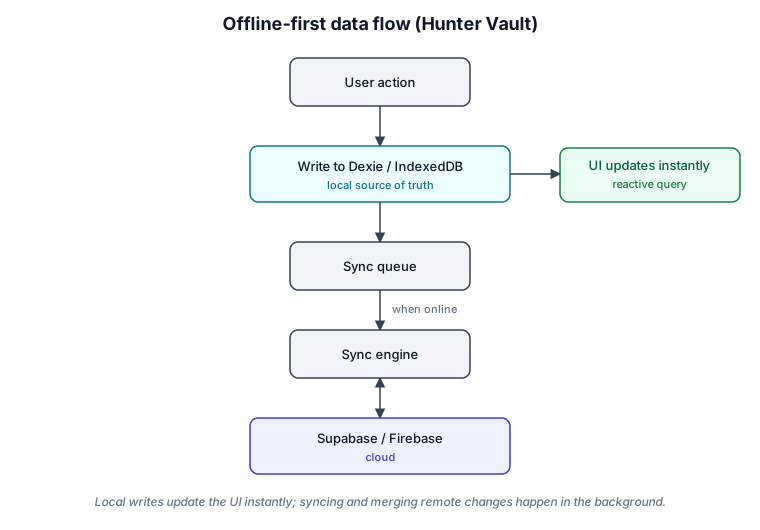
The user acts, the change is written to Dexie, the reactive query updates the UI immediately, and — separately, in the background — the change is queued and synced to the cloud when there's a connection. Nothing the user does waits on the network.
Cloud synchronization — the hard part
Syncing a local-first database to the cloud is the part that earns its own article, because it's where offline-first is genuinely difficult. When the device is the source of truth and multiple devices can edit the same data, you have to solve, at minimum: stable identifiers that agree across devices, timestamps to order changes, handling deletes (a deleted record has to be communicated, not just absent), conflict resolution when two devices changed the same thing, retrying failed syncs, and the difference between an initial full sync and ongoing incremental syncs. Hunter Vault syncs to Supabase and Firebase for exactly these remote concerns, but the mechanics deserve real depth — so I've put them in a dedicated piece: synchronizing IndexedDB with Supabase. The short version: every syncable record carries both a local ++id (used for all in-app foreign keys) and a uuid (the cloud's canonical key, stamped centrally by a Dexie creating hook). Deletes are physical locally — a Dexie deleting hook appends { table, uuid, deletedAt } to a localStorage tombstone list that gets pushed on the next sync and then cleared. Conflict resolution is last-write-wins on updatedAt, bumped automatically by a Dexie updating hook on every local write; remote tombstones always win over local edits. Local writes never block on sync, and remote changes are merged back into Dexie, which re-renders the UI through the same reactive queries.
Backup and recovery
A useful side effect of syncing to the cloud is that the cloud copy doubles as a backup. A user can reinstall the app or move to a new device and restore their data rather than starting over — which, for a finance app holding months of records, is not optional. The tension to be aware of is that the on-device copy and the cloud copy have to reconcile cleanly, which loops back to the same synchronization problem above.
Testing offline scenarios
Offline-first adds test surface that a server-first app doesn't have, and it's worth being deliberate about it: recording and editing while fully offline, going offline mid-sync, conflicting edits made on two devices, a fresh install restoring from the cloud, and — easy to forget — migrations running against old on-device data rather than a clean database. Browser devtools can simulate offline and throttled connections for the first cases; migrations are best tested against seeded databases that look like a previous version.
Tradeoffs and when offline-first is overkill
Offline-first is real added complexity: a local database to model and migrate, a sync engine to build and maintain, conflicts to resolve, and more to test. It's worth it when the app must work without a connection or has to feel instant — finance apps, field tools, note-taking, anything used on the move. It's overkill for an app that's meaningless offline (a live dashboard, an admin panel) or a mostly-read, server-first product where a normal data-fetching layer is simpler and enough. Choose it because your users need it, not because it's interesting to build.
FAQs
Why Dexie instead of raw IndexedDB or localStorage?
localStorage is too small, synchronous and string-only for real app data. Raw IndexedDB can handle the data but has an awkward, verbose API. Dexie is a thin typed layer over IndexedDB that makes schemas, queries and migrations manageable and adds reactive queries — which is what makes it pleasant in React.
How do you handle schema changes when users already have data?
With versioned migrations. You bump the Dexie schema version and describe the change, and it upgrades each user's local database in place. The hard rule is never to drop or corrupt data users already have, because in an offline-first app those records aren't reproducible from a server.
Do derived values like balances get stored?
No. Balances and totals are computed from the underlying records on read. Storing them creates a second source of truth that drifts out of sync — the exact bug that pushed me to derive savings-goal progress instead of storing it.
How does offline data get to the cloud?
Through background sync. The local database is the source of truth; changes are queued and pushed to the cloud when a connection is available, and remote changes are merged back locally. The detailed mechanics — identifiers, conflicts, deletes — are their own subject, covered in the sync deep-dive.
Building something that needs to work offline? See how I help teams design and build production React and mobile applications →
Related: synchronizing IndexedDB with Supabase · how I structure production React applications · the React hub