
If you want a short answer: I structure production React applications by feature, not by file type, and I decide where state lives before I decide where files go. That single pair of decisions — feature-based architecture plus deliberate state ownership — is what keeps an app changeable a year later, when the codebase is three times bigger and half the original assumptions are wrong.
This isn't a "correct folder structure" post. There is no correct structure. What follows is the React application architecture I've landed on after building and shipping real web and mobile products, why I make the tradeoffs I make, and — just as important — what I'd do differently on a small app versus a large team.
Quick summary
- Organize by feature, not by generic
components/,hooks/,utils/folders. - Give each feature a small public API (an
index.ts) so the rest of the app can't reach into its internals. - Decide state ownership per feature; not every value belongs in a global store.
- Keep a thin services layer (data access, sync, auth) so features don't talk to the network or the database directly.
- Structure exists to make change safe — finding things, modifying them, and not breaking neighbours.
- The right structure scales with the app: less ceremony when it's small, harder boundaries when a team is involved.
Folder structure isn't the real question
Most "how should I structure my React app" questions are really questions about change. When an app is small, any structure works. The pain shows up later: you need to modify one feature and you can't tell what you'll break, or a "shared" component quietly grew three responsibilities and now half the app depends on it.
So the thing I optimize for isn't tidiness. It's this: when I open the codebase in six months, can I find the thing, change it, and be confident I didn't break something two features away? Every decision below is in service of that.
The two apps this is based on
Most of this comes from two production apps I've built and shipped.
Hunter Vault is an offline-first personal finance app. It runs on the web and ships to iOS and Android from a single React codebase through Capacitor, and it launched on both app stores on April 12, 2026. I'm the primary developer — I've owned the architecture, implementation, mobile releases, debugging and ongoing improvements since launch. It carries real domain weight: more than a dozen feature areas, including accounts (I call them Vaults), transactions, transfers, budgets, recurring bills, debts and credit cards, savings goals, gamification (quests, achievements, leaderboards), reports, onboarding, cloud sync, subscriptions and settings. Data lives locally in IndexedDB through Dexie and syncs to the cloud; RevenueCat handles subscriptions.
Here's the high-level shape:
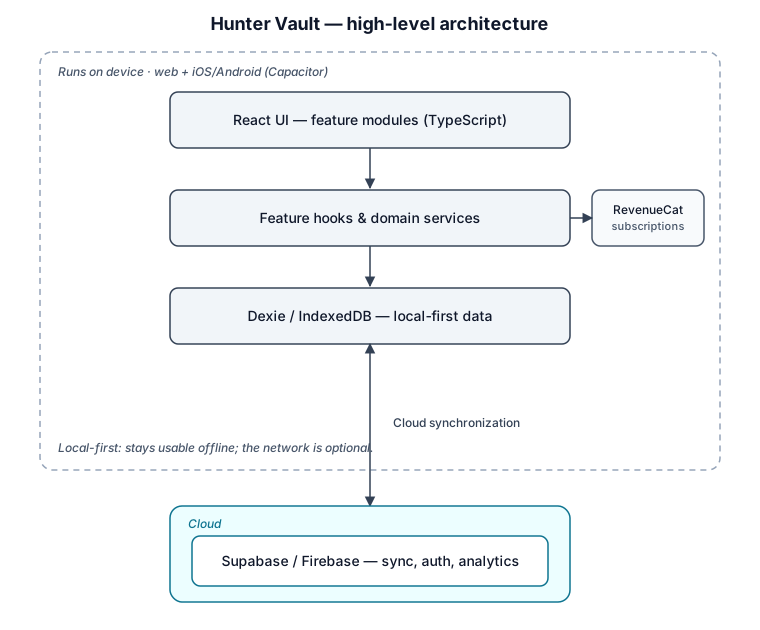
The local database is the important part: the app is designed to stay useful without waiting on the network for every interaction.
Zendtri POS is a multi-tenant point-of-sale and inventory platform built on React, Vite and Supabase. Multiple businesses share one deployment, so tenant isolation, role-based access and data ownership shape the architecture as much as the screens do. Its major areas include POS checkout, inventory, purchasing, receiving, stock transfers, cash management, reporting, branches and role-based access.
Neither app started this complex — which is the real point of a couple of sections below.
How I organize a production React app
Here's the shape I reach for. Then I'll walk through each part and the reasoning.
src/
  app/                 # providers, router, global layout
  features/
    accounts/          # "Vaults"
    transactions/
    transfers/
    budgets/
    bills/             # recurring transactions
    debts/
    savings-goals/
    quests/            # quests, achievements, leaderboards
    reports/
    onboarding/
    settings/
      # each feature: components/  hooks/  services/  types.ts  index.ts
  components/           # shared, generic UI (Button, Modal, Table)
  hooks/               # cross-feature hooks (useMediaQuery, useDebounce)
  services/            # shared infra: db (Dexie), sync, auth, subscriptions, analytics
  stores/              # cross-feature client state
  lib/                 # pure helpers, no React
  types/               # shared/global types
Organize by feature, not by file type
The default React tutorial structure groups everything by what it is: all components in components/, all hooks in hooks/. That reads fine at ten files and becomes a maze at two hundred, because a single feature is now smeared across five top-level folders. To touch "transactions" you're hunting through the components folder, the hooks folder, the services folder, and back.
Feature-based organization keeps everything a feature needs in one place. When I work on transactions, the components, hooks, services and types are right there. When I delete a feature, I delete a folder. The generic top-level components/, hooks/ and services/ folders still exist — but only for genuinely shared, cross-feature things.
I go deeper on this in my folder structure guide; the short version is that the unit of organization should match the unit of work, and the unit of work is almost always a feature.
Give each feature a public API
Feature folders solve half the problem. The other half is boundaries. If any file can import any other file, "feature-based" is just cosmetic — everything still couples to everything.
So each feature exposes a small public surface through an index.ts, and the rest of the app imports only from there:
// features/transactions/index.ts
export { TransactionList } from "./components/TransactionList";
export { useTransactions } from "./hooks/useTransactions";
export type { Transaction } from "./types";
// everything else in the folder is private to the feature
Now import { useTransactions } from "@/features/transactions" is allowed, and reaching into features/transactions/hooks/internal/... is not. That one convention is what lets me refactor a feature's internals freely: as long as the public API is stable, nothing outside the folder cares how it works inside.
A thin services layer
Features don't call fetch directly, and they don't talk to Dexie or Supabase directly. That access goes through a small services layer, so a feature depends on an interface rather than on the network or the database.
// services/api.ts
const BASE_URL = import.meta.env.VITE_API_URL;

async function request<T>(path: string, init?: RequestInit): Promise<T> {
  const res = await fetch(`${BASE_URL}${path}`, {
    headers: { "Content-Type": "application/json", ...init?.headers },
    ...init,
  });
  if (!res.ok) throw new ApiError(res.status, await res.text());
  return res.json() as Promise<T>;
}

export const api = {
  get: <T>(path: string) => request<T>(path),
  post: <T>(path: string, body: unknown) =>
    request<T>(path, { method: "POST", body: JSON.stringify(body) }),
};
The payoff is concentrated change. Auth headers, error handling, retries, base URLs — they live in one place. In an offline-first app it matters even more, because the "service" for a feature might be the local database in one path and the network in another, and the feature shouldn't have to know which.
Hooks are where logic lives
Components render; hooks decide. I push data access, derived values and side effects into feature hooks (useTransactions, useAccountBalance) and keep components mostly about presentation. This keeps components testable and readable, and it means the interesting logic — the part worth testing — isn't tangled up in JSX.
Decide state ownership per feature
This is the decision I make before any folder decision, and it's the one most apps get wrong: they reach for a global store by default.
Most state isn't global. Component toggles are local. Server data belongs in a data-fetching layer, not copied into a store. URL state (filters, pagination) belongs in the URL. Only genuinely shared client state — session, theme, a few cross-feature concerns — earns a spot in stores/.
Getting this wrong is the root cause of a surprising share of "React is hard to maintain" complaints, so I gave it its own article on choosing state management. For architecture purposes, the rule is: state has an owner, and the owner is as local as it can be.
Routing, error handling, environment config
Routing lives in app/, and route-level code-splitting maps cleanly onto features. Error handling is layered: a top-level boundary so the whole app never white-screens, plus boundaries around risky features (I lean on react-error-boundary rather than hand-rolling class components). Environment configuration goes through typed access to import.meta.env in one module, never scattered reads — this is also what keeps web and native builds honest, since they don't always share the same environment.
Build and deployment structure
Hunter Vault's build has to produce a web app and native iOS/Android bundles from the same source, which Capacitor handles — but it shapes the structure: native concerns get isolated so they don't leak into shared code, and subscriptions run through RevenueCat's SDK on-device while the cloud services stay behind the sync layer. I cover that path end to end in turning a React web app into iOS and Android apps.
What changes as the application grows
No single structure is right at every size. Here's how I dial it up and down — and where Hunter Vault actually sits.
Small applications. Feature folders, minimal ceremony. Hunter Vault started here — it was closer to a local expense-and-budget tracker, and most behavior lived inside the screens. At that size that's fine; boundaries you don't need yet are just friction, so I'd skip strict feature public APIs and let a store be a single file.
Medium applications. This is where Hunter Vault is now, and the transition was specific. Once accounts, transfers, debts, goals, recurring bills, reports, quests, leaderboards, subscriptions and cloud sync all started touching the same financial data, organizing the app around screens stopped being enough. The shift was from pages that held most of the feature behavior to thin pages sitting on top of layers:
Thin pages
   ↓
Feature components & hooks
   ↓
Domain services
   ↓
Shared infrastructure (database, sync, subscriptions, analytics)
Feature-specific components, hooks, types and logic moved together into features; shared infrastructure moved out of the screens. That's the point where strict feature APIs, a real services layer and deliberate state ownership start paying for themselves.
Large teams. Across the teams I lead in my day job, the structure barely changes but enforcement does: import boundaries get linted rather than trusted, features get human owners, and shared code gets treated as an internal API with real review — because the failure mode is no longer a messy folder, it's two people stepping on each other.
Mistakes I've made
The structure above didn't come from a diagram; it came from getting things wrong first. Three that taught me the most:
I modeled savings goals as money movements
When I built savings goals in Hunter Vault, my first model treated a contribution to a goal as a real transaction that deducted from the linked account's balance. That worked when a goal behaved like a separate virtual pot. It broke for users who simply wanted a goal to track money already sitting in their real savings accounts: their Hunter Vault balance stopped matching their bank, because the same money was represented twice — once in the account and again in the goal.
The wrong balances were only a symptom. The real mistake was that I'd collapsed two different domain concepts into one feature. The fix was to model how a goal gets its balance explicitly, splitting it into two types: a Goal Account that owns a dedicated account, so contributions behave like real money movements; and Track Savings that links one or more existing accounts and derives the goal's progress from them without touching their ledgers. The components got simpler too, because they no longer had to guess whether a contribution should create a transaction.
The lesson: when one feature keeps needing "if it's this kind of thing do X, otherwise Y," that's often two concepts wearing one name.
I required too much setup before the dashboard was useful
Hunter Vault's dashboard computes budget usage, estimated income, upcoming bills, savings progress and a safe-to-spend number. As I added systems, the dashboard came to depend on more and more setup data. A user could add an account and log an expense, but sections still needed estimated income, a budget, recurring bills and goals before they made sense — and my first approach surfaced all of those missing requirements straight to the user. Onboarding felt long, and it fed real feedback that the app was complicated.
Architecturally, the dashboard had quietly taken on two jobs: showing financial information and explaining every unfinished configuration state. I moved to progressive setup — the app works out which parts of the profile are ready and shows a simpler or partial state until there's enough data, introducing systems like estimated income and bills when they become relevant. That forced me to separate three things a single isOnboardingComplete flag had been mashing together: whether the user finished a setup step, whether a calculation has enough data to run, and how the dashboard presents an incomplete result.
The lesson: "is it set up," "is there enough data," and "how do we render the gap" are three different questions, and one boolean can't answer all three.
I let a complex write live across several screens
This one's from a task-management project. Creating a task grew to involve the task itself, its subtasks and attachments. I first handled those as separate frontend operations, which made the workflow hard to reason about: one call could succeed while another failed, leaving half-created data.
I moved the workflow behind a single NestJS endpoint that creates the task, subtasks and attachment records as one coordinated operation, using a per-request Supabase client so authorization and Row Level Security stay tied to the authenticated user. The lesson: a React feature can own the interaction, the form state and the user feedback — but that doesn't mean it should own every business transaction. Multi-step writes that must all succeed or all fail belong behind one backend operation.
Tradeoffs
Feature-based architecture with hard boundaries isn't free. It adds indirection: a public API per feature is another file to maintain, and the services layer means a bit more plumbing before you can hit an endpoint. On a weekend project that overhead isn't worth it. And boundaries can be drawn wrong — the wrong feature split is more painful than no split, because now the seams fight you.
It's also worth being honest about what structure can't do. It reduces the cost of change; it doesn't fix a wrong model. The savings-goals mistake above was a modeling error, and no folder layout would have prevented it.
When to use this approach
Reach for the full structure when the app has real domain complexity, will be maintained for months or years, or has more than one person touching it. Keep it lightweight when the app is small, short-lived or exploratory — you can always tighten boundaries later, and it's easier to add a wall than to remove one you didn't need.
My recommendation
Compressed into a decision framework: start feature-based from day one, because it costs almost nothing early and is expensive to retrofit. Add public-API boundaries once you have more than a handful of features. Decide state ownership explicitly, defaulting to the most local option. Keep a thin services layer so change stays concentrated. And let the enforcement — not the shape — scale with your team.
FAQs
Should I use a framework like Next.js or just Vite?
The React docs now recommend starting most new apps with a framework, while still pointing to Vite (and Parcel, Rsbuild) for projects that need a custom setup. In practice I choose by requirements: an SEO-heavy public site leans framework, while an offline-first, Capacitor-based app like Hunter Vault — and a POS like Zendtri — are squarely the "custom setup" case where Vite fits better. Pick based on what you're building, not on what's trending.
How many features is too many for one folder?
There's no magic number. If scrolling the features/ folder is how you navigate, that's fine. When features start needing to share a lot of code, that's a signal to extract a shared module — not to flatten everything back into type-based folders.
Where do shared types go?
Types used by one feature live in that feature's types.ts. Types shared across features go in a top-level types/. If you also share types with a backend, that's a bigger conversation — I'll cover cross-boundary types in the JavaScript/TypeScript articles.
Do I really need this structure for a small app?
No. Use the feature-based idea (keep related things together) but skip the ceremony — public APIs, a full services layer, a global store. Add those when the app grows into them, the same way Hunter Vault did.
Building something that needs this kind of structure? See how I help teams design and build production React applications →
Related: React folder structure for scalable applications · how to choose state management for a React app · the React hub