

The React folder structure I use for anything that has to scale is simple to state: organize by feature, not by file type. Instead of one big components/ folder, one big hooks/ folder and one big utils/ folder, each feature owns its components, hooks, services and types in a single folder, and only genuinely shared code lives at the top level.
That one choice is the difference between a project you can still change comfortably at two hundred files and one you're afraid to touch. Below is the exact shape I use, what goes where, and why feature-based organization holds up as an app grows — with real examples from Hunter Vault, an offline-first finance app I've shipped to web, iOS and Android.
Quick summary
- Group files by feature, not by
components//hooks//utils/. - Give each feature a single public API (
index.ts); everything else in the folder stays private. - Keep top-level
components/,hooks/,services/for shared, cross-feature code only. - Use a path alias (
@/) so imports don't turn into../../../. - Colocate tests with the code they test.
- Add ceremony (public APIs, shared layers) only when the app grows into it.
The problem with organizing by file type
The structure most tutorials teach groups files by what they are: every component in components/, every hook in hooks/. It's fine at ten files. It falls apart at scale because a single feature ends up smeared across several top-level folders.
In Hunter Vault, "transactions" isn't one file — it's a list, a form, the hooks that load and mutate records, a service that talks to the local database, and its own types. In a type-based layout, changing anything about transactions means jumping between components/, hooks/ and services/, mentally reassembling a feature that the folders have scattered. Multiply that by accounts, budgets, transfers, debts, savings goals, reports and the rest, and navigation becomes archaeology.
The deeper issue is that proximity is following the wrong axis. Files that change together should live together. They almost never change together because they're "both hooks" — they change together because they're both part of transactions.
The folder structure I use
Here's the top-level shape. It's the same structure I describe in my production React architecture guide; this article zooms into the folders themselves.
src/
  app/                 # providers, router, global layout
  features/
    accounts/          # "Vaults"
    transactions/
    transfers/
    budgets/
    bills/             # recurring transactions
    debts/
    savings-goals/
    quests/            # quests, achievements, leaderboards
    reports/
    onboarding/
    settings/
  components/           # shared, generic UI (Button, Modal, Table)
  hooks/               # cross-feature hooks (useMediaQuery, useDebounce)
  services/            # shared infra: db (Dexie), sync, auth, subscriptions, analytics
  stores/              # cross-feature client state
  lib/                 # pure helpers, no React
  types/               # shared/global types
Anatomy of a feature folder
Every feature follows the same internal layout, so once you know one, you know all of them:
features/transactions/
  components/
    TransactionList.tsx
    TransactionForm.tsx
  hooks/
    useTransactions.ts
    useTransactionForm.ts
  services/
    transactions.service.ts    # reads/writes through the shared db layer
  types.ts
  index.ts                     # the only public entry point
The index.ts is what makes this more than cosmetic. It's the feature's public API — the one door the rest of the app is allowed to open:
// features/transactions/index.ts
export { TransactionList } from "./components/TransactionList";
export { useTransactions } from "./hooks/useTransactions";
export type { Transaction } from "./types";
// everything else stays private to the feature
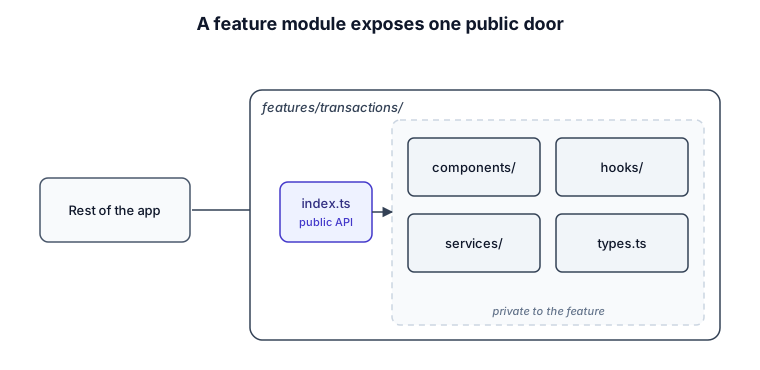
Now imports have a clear rule:
// allowed — through the public API
import { useTransactions, TransactionList } from "@/features/transactions";

// avoid — reaching into another feature's internals
import { formatAmount } from "@/features/transactions/utils/formatAmount";
The payoff is refactoring freedom. As long as the exports in index.ts stay stable, I can rename files, split components or rewrite a hook inside the feature and nothing outside the folder breaks. The boundary is what turns "feature folders" into actual isolation.
Shared vs feature code: where things go
The most common question with this structure is when something graduates from a feature folder to the top level. My rule: a component, hook or helper moves to the shared top-level folders only when it's used by two or more features and it's stable. Until both are true, it stays inside the feature that owns it.
Premature sharing is its own trap. Hoist a component to components/ too early and you've coupled every future consumer to an abstraction you designed before you understood the second use case. It's cheaper to duplicate a little and extract later than to un-share something half the app now depends on.
Shared infrastructure is the clear exception. The database layer, cloud sync, auth, subscriptions and analytics aren't owned by any one feature, so they live in services/ from the start and features reach them through a thin interface rather than talking to Dexie or the network directly.
Naming and import conventions
A few conventions keep the structure legible:
- Absolute imports via an alias. Configure
@/to point atsrc/so imports read@/features/transactionsinstead of a chain of../../... It also makes moving files far less painful. - Consistent feature names. I keep feature folders lowercase and kebab-cased (
savings-goals), and name files for what they are (TransactionForm.tsx,useTransactions.ts). - Colocate tests. A test lives next to the thing it tests (
useTransactions.test.tsbesideuseTransactions.ts), so deleting a feature deletes its tests too. index.tsis for feature public APIs, not every folder. Barrel files everywhere invite circular imports and bundle bloat. Use them at the feature boundary, not as a reflex.
Why feature-based scales
Three concrete reasons this structure holds up:
Deleting is trivial. Removing a feature is removing a folder. No hunting through four shared directories for stray files. That alone tells you the coupling is where it should be.
The blast radius of a change is visible. When logic lives inside a feature and the outside world only touches its index.ts, you can see what a change can affect. Type-based folders hide that — anything might import anything.
People can work in parallel. Two developers on two features are working in two folders, not fighting over one giant components/ directory. On a team, that's the difference between smooth and constant merge conflicts.
What changes as the folder grows
The structure isn't fixed at every size.
Small apps don't need most of it. If you have a handful of screens, skip the per-feature index.ts and the shared services layer — feature folders alone are plenty, and boundaries you don't need yet are just friction.
Medium apps are where the full structure earns its keep. Hunter Vault reached this point once accounts, transfers, debts, goals, bills, reports and the rest all touched the same financial data — strict feature APIs and a real shared-infrastructure layer stopped being optional. (I walk through that transition in more depth in the architecture guide.)
Large codebases and teams add one more level: group related features into domain areas, and enforce the import boundaries with lint rules rather than trusting them. At real scale you might extract the shared layers into their own packages. The shape barely changes; the enforcement does.
Tradeoffs and when a flat structure is fine
Feature folders add a little indirection — a public API per feature is one more file, and deciding what's shared versus local is a judgment call you'll sometimes get wrong. For a prototype, a demo or a genuinely small app, a flat structure is completely fine, and reaching for this one would be overhead you don't need. Structure should match the size of the problem; you can always add walls later, and it's far easier than removing ones you didn't need.
FAQs
Should tests live next to components or in a separate __tests__ folder?
I colocate them next to the code. A test beside its file is easy to find, moves with the file, and gets deleted when the feature does. A separate top-level test tree drifts out of sync over time.
Where do shared UI components go?
In the top-level components/ folder — but only once they're used by more than one feature and the API has settled. Before that, keep the component inside the feature that uses it.
Do I need an index.ts in every folder?
No. Use it at the feature boundary as the public API, and skip it elsewhere. Barrel files in every folder tend to create circular imports and larger bundles for no real benefit.
How is this different from just using components/, hooks/ and utils/?
Those folders organize by what a file is; feature folders organize by what a file is for. Since files change together by feature, not by type, feature-based grouping keeps related code together and scales far better as the app grows.
Want a codebase that stays easy to change as it grows? See how I help teams design and build production React applications →
Related: how I structure production React applications · how to choose state management for a React app · the React hub