

There's no single right way to build forms in a large React app — the right approach depends on how the form behaves. I use controlled React state for forms with custom interaction or tightly-coupled calculations, and I'd reach for a form library when a form is large and conventional with many independent fields. Validation splits the same way: fast feedback lives in the UI, but rules that affect correctness live outside the component. Getting those choices right matters more than picking a "best" form library.
This article covers how I make those calls in production — where controlled state wins, where a form library earns its place, how I handle validation, conditional fields, dynamic lists and async submission — drawing on Hunter Vault (a finance app full of custom, calculation-heavy forms) and the kind of larger business forms in a POS like Zendtri.
Quick summary
- No library wins by default — match the approach to the form's interaction.
- Controlled state for custom, calculator-style and live-derived forms.
- A form library for large, conventional forms with many independent fields.
- Schema-based validation to centralize reusable rules (and share them with the server).
- Domain and server validation for anything correctness-critical — the form is not the boundary.
- Controlled state makes derived values trivial — compute from the current input, don't store it.
There's no one form approach — match it to the interaction
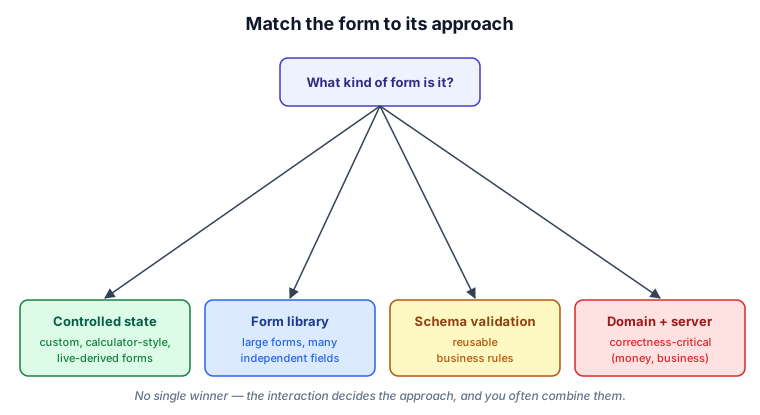
The decision comes down to four questions. Is the form highly custom, calculator-style, or does it derive values live? Controlled state. Is it a large, conventional form with lots of independent fields? A form library. Do you have validation rules you want to reuse? Put them in a schema. Does a rule affect financial or business correctness? Enforce it outside the component, on the server. Most real apps use more than one of these at once.
Controlled state for custom, calculator-style forms
Hunter Vault's forms are mostly the custom kind, so I primarily use controlled React state — sometimes wrapped in feature-specific hooks so components stay focused on the interaction rather than the plumbing. The reason is that its forms have behavior a generic form library isn't built for: calculator-style numeric entry, fields that appear and disappear based on other inputs, and calculations that update live as you type. Transaction entry, account setup, budgets, savings goals and transfers all work this way.
Controlled state shines here because a value you control is a value you can derive from instantly. A transfer form can show the resulting balance as the user types, with no second piece of state to keep in sync:
function TransferForm({ sourceBalance }: { sourceBalance: number }) {
  const [amount, setAmount] = useState(0);

  // derived live from the current input — nothing separate to keep in sync
  const remaining = sourceBalance - amount;
  const exceedsBalance = amount > sourceBalance;

  return (
    <>
      <NumericInput value={amount} onChange={setAmount} />
      <p>Remaining: {remaining}</p>
      {exceedsBalance && <p role="alert">Amount exceeds available balance</p>}
      <button disabled={exceedsBalance || amount <= 0}>Transfer</button>
    </>
  );
}
That live-derived remaining is the same principle I apply to balances everywhere — compute from current data rather than storing a copy that can drift.
When a form library earns its place
The other side of the decision, honestly: for a large, conventional form with many independent fields, controlled state becomes a lot of boilerplate, and every keystroke re-rendering the whole form is wasteful. That's where a form library like React Hook Form pays off — it reduces the boilerplate and isolates field updates so changing one field doesn't re-render the rest. The larger business forms in a POS — products, receiving, purchase orders — are exactly that shape.
In practice, Zendtri's forms are controlled useState throughout. React Hook Form and Zod are in package.json — they came in with the shadcn scaffold — but they have zero actual usage in feature code. Every form is manual state and onChange handlers. That's not a deliberate design principle; those forms were built before the question of standardising on a form library was seriously revisited. For a new build of the same kind of app I'd establish the library pattern early, because the forms that warrant it will show up, and retrofitting them later is the harder path.
One current caveat if you go this route: if you're also adopting React Compiler, verify the library's compatibility with your version. Form libraries often rely on mutable refs and imperative reads to isolate updates, and those patterns can interact unexpectedly with the compiler's memoization — it's worth checking the current guidance rather than assuming.
Schema-based validation for reusable rules
For validation rules you use in more than one place, a schema keeps them in one spot instead of scattered through components. With a schema library (Zod, for example) the rule is defined once and can validate the form and, ideally, the same payload on the server:
import { z } from "zod";

export const transferSchema = z.object({
  fromAccountId: z.string().min(1),
  toAccountId: z.string().min(1),
  amount: z.number().positive(),
}).refine((t) => t.fromAccountId !== t.toAccountId, {
  message: "Choose two different accounts",
  path: ["toAccountId"],
});
Defining the rule once and reusing it is what keeps client and server validation from drifting apart over time.
Domain validation belongs outside the component
Here's the judgment that matters most. Validation in the form is for user experience — instant feedback, a disabled submit button, a helpful message. But a rule that affects correctness — a transfer can't exceed the source balance, a business constraint on an order — must be enforced in domain logic and on the server, not trusted to the form. The form is not the boundary, for the same reason the frontend isn't the boundary in a multi-tenant app: anything the client controls can be bypassed. Keeping correctness-critical rules in a domain layer is also what makes them clean, testable pure functions rather than logic tangled into a component — which connects directly to my testing strategy.
Conditional fields, dynamic lists and derived values
Controlled state handles the dynamic parts naturally. Conditional fields are just rendering driven by current values — show the credit-card fields only when the account type is a card. Dynamic lists (add and remove rows) are array state, and any total is derived live rather than tracked separately:
// splitting one transaction across several categories
const [splits, setSplits] = useState([{ category: "", amount: 0 }]);
const total = splits.reduce((sum, s) => sum + s.amount, 0); // derived, not stored
The recurring theme: when the form owns the values, everything downstream — visibility, totals, validation state — is a calculation, not another thing to keep in sync.
Async submission, errors and disabled states
The submit lifecycle needs its own care: disable the button while a submission is in flight so it can't fire twice, surface validation and server errors clearly, and handle failure without losing the user's work. In an offline-first app there's an extra wrinkle — "submit" may mean writing locally and syncing later, so the form should confirm the local write immediately rather than hang waiting on the network.
Accessibility and restoring entered data
Two things that are easy to skip and shouldn't be. Label your fields properly — it's essential for screen readers, and it also makes forms testable, since behavior tests query by label the way a user would. Announce errors so assistive tech notices them (role="alert"). And don't throw away a user's input on a navigation or a failed submit — restoring previously entered data matters everywhere, and it matters most on mobile, where re-typing a form is genuinely painful.
Tradeoffs and recommendation
Controlled state gives you complete control at the cost of more code; a form library removes boilerplate but fits custom, calculation-heavy interaction less well; a schema adds a little setup in exchange for consistent, reusable validation. None of them is the answer on its own. My recommendation: use controlled state for custom and live-derived forms, a form library for large conventional ones, schema-based validation for reusable rules, and domain-plus-server validation for anything correctness-critical — and expect to combine them in the same app, because a large app has all of these kinds of forms.
FAQs
Should I use a form library or controlled state?
It depends on the form. Controlled state suits custom, calculator-style or live-derived forms where you want full control; a form library suits large, conventional forms with many independent fields, where it cuts boilerplate and isolates re-renders. Neither is universally better.
Where should validation live?
Fast, UX-focused validation lives in the form. Rules that affect correctness — money limits, business constraints — belong in domain logic and on the server, because the form can always be bypassed. Use both: the form for feedback, the server for the guarantee.
Do I need a schema library like Zod?
Not for simple forms. It becomes worthwhile when you have validation rules you want to reuse — especially to validate the same payload on the client and the server without letting the two definitions drift apart.
How do I handle forms that compute values as the user types?
Controlled state makes this straightforward: derive the computed values from the current inputs on each render rather than storing them as separate state. That keeps a single source of truth and avoids sync bugs.
Building complex forms in a React app? See how I help teams design and build production React applications →
Related: my React testing strategy · building an offline-first React app with Dexie · the React hub