

Choosing state management for a React app isn't really one decision. The mistake most teams make is treating "state management" as a single choice — pick Redux, or Zustand, or Context, and route everything through it. In practice, the useful skill is putting each piece of state in the right place, and most state doesn't belong in a global store at all.
This guide breaks React state into the categories that actually matter, gives you a decision procedure for each, and shows how the same thinking plays out in real apps — an offline-first finance app (Hunter Vault) and a multi-tenant POS (Zendtri). By the end you'll have a repeatable way to answer "where should this state live?" instead of reaching for the same tool every time.
Quick summary
- "State management" is really six different problems, not one.
- Local UI state stays in the component (
useState); don't globalize it. - Server data belongs in a server-state layer with caching — not copied into a store.
- URL state (filters, pagination, the selected record) belongs in the URL.
- Form state belongs in controlled state or a form library.
- Offline/persisted state belongs in IndexedDB (I use Dexie).
- Only genuinely shared client state (session, theme, an in-progress cart) earns a store or Context.
"State management" is really six different problems
Once you split state by what it actually is, most of the confusion disappears. There are six kinds worth separating:
- Local UI state — toggles, open/closed panels, an input's current value, hover. It matters to one component.
- Shared client state — session, theme, or something like an in-progress POS cart. It's client-owned but needed in several places.
- Server state — data that lives in your backend or database. The tricky part isn't holding it; it's keeping it fresh.
- URL state — filters, pagination, tabs, the currently selected record. It should be shareable and survive a refresh.
- Form state — field values, validation, dirty/submitting flags.
- Persisted offline state — data that must survive a reload or work with no network, on-device.
Each of these has a natural home. Trouble starts when you force one tool to do all six.
A decision table
| State type | What it is | Where it usually belongs |
|---|---|---|
| Local UI state | toggles, inputs, open/closed | useState in the component |
| Shared client state | session, theme, in-progress cart | Context (simple) or a store like Zustand (complex) |
| Server state | data owned by your backend/DB | a server-state / data-fetching layer with caching |
| URL state | filters, pagination, selected record | the URL (router params / search params) |
| Form state | field values, validation, submission | controlled state or a form library |
| Persisted offline state | must survive reload / work offline | IndexedDB (e.g. Dexie) |
Where should this state live?
When I'm unsure, I run through the questions in order and stop at the first "yes":
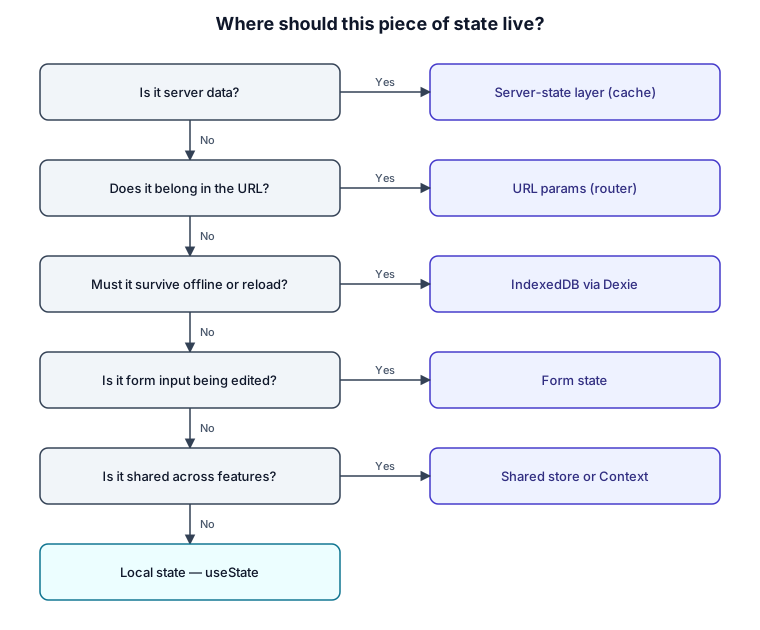
The order matters. Asking "is it server data?" first stops you from copying backend data into a store — the single most common state mistake. Checking the URL early keeps things like filters shareable and refresh-proof. And local useState is the default, not the last resort: if none of the earlier questions apply, the state belongs in the component and nowhere else.
How this maps to a real app
Here's how the categories fall out in practice.
In Hunter Vault, the interesting state is persisted and offline. Accounts, transactions, budgets and the rest live in IndexedDB through Dexie, with reactive live queries so the UI updates the moment local data changes — the app has to stay fully usable with no network. Derived numbers like an account balance or a savings-goal's progress aren't stored as separate state at all; they're computed from the records that already exist (more on why below). Session lives in shared client state; a report's date range and filters live in the URL so a view is shareable and survives a reload; a transaction form is form state while it's being edited.
In Zendtri, a POS, the in-progress sale is a good example of legitimate shared client state — the cart isn't server data until it's submitted, and several parts of the checkout UI need it, so a client store is the right home. Products, inventory and past sales are server state from Supabase; the current branch and filters live in the URL; role and tenant context is shared client state that shapes what the rest of the app is allowed to do.
The specific library choices for client state and server state get their own deep-dive in Context vs Zustand vs server state. This article stays at the category level so the right placement decision is clear before you pick a tool.
Where the wrong choice causes pain
Most state problems trace back to putting state in the wrong category. The ones I actively watch for:
Copying server data into a store. The moment backend data lives in Zustand or Context, you own a second copy that can go stale, and you inherit cache invalidation, loading states and "which one is right?" forever. Keep server data in a server-state layer that treats the server as the source of truth.
Storing what you can derive. In Hunter Vault, my first savings-goals model stored a goal's balance and moved money into it as if it were a real transaction, which meant the same money could be represented twice and balances stopped matching the user's bank. The fix was to derive a goal's progress from its linked accounts instead of storing it. I cover the full modeling story in my architecture write-up; the state lesson is narrower and worth stating on its own: if a value can be computed from state you already have, don't store it as separate state.
Filters and pagination in component state. Put them in the URL. State in the URL is shareable, deep-linkable and survives a refresh; the same values buried in useState are none of those things.
Globalizing by reflex. Reaching for a global store for values that only one component uses adds coupling and needless re-renders. Default to local; promote a value only when something concrete forces you to.
Tradeoffs and keeping it simple
More categories don't mean more libraries. A small app might need nothing beyond useState and a lightweight way to fetch data — adding a global store and a form library to that is overhead, not architecture. The point of the framework isn't to install six tools; it's to recognize which of the six problems you actually have, and often you only have two or three. Reach for a store or a form library when the pain is real, not preemptively.
My recommendation
Start every "where does this go?" question by asking what kind of state it is, and answer in this order: server data goes in a server-state layer, URL-worthy state goes in the URL, offline/persisted state goes in IndexedDB, form input stays in form state, genuinely shared client state gets a store or Context, and everything else stays local. Default to the most local option and only promote state when there's a concrete reason. Get the categories right and the choice of library becomes a small, reversible detail rather than the thing your whole app depends on.
FAQs
Do I need Redux or a global store?
Usually less than you think. Most apps need a store only for genuinely shared client state, and even then a lighter option like Zustand or Context often covers it. Server data, URL state and form state each have better homes, so a store ends up managing a smaller slice than people expect.
Should server data go in Zustand or Context?
No. Server data belongs in a server-state / data-fetching layer that caches it and treats the backend as the source of truth. Putting it in a client store creates a second copy that drifts out of date and drags cache invalidation into your UI code.
Where do filters and pagination go?
In the URL. That makes the current view shareable, bookmarkable and refresh-proof, and it keeps a single source of truth for "what is the user looking at."
Is Context "state management," and when is it enough?
Context is a way to pass state down without prop-drilling, not a performance tool. It's enough for low-frequency shared values like theme or session. For state that changes often or is read widely, a purpose-built store usually causes fewer re-renders — which is exactly the comparison I make in Context vs Zustand vs server state.
Trying to untangle state in a growing React app? See how I help teams design and build production React applications →
Related: React Context vs Zustand vs server state · how I structure production React applications · the React hub