

The point of testing a React app isn't coverage — it's confidence, per unit of effort. My testing strategy comes down to two rules: test by risk (put the effort where a bug would hurt most), and test behavior, not implementation details (assert what the app does, not how it's wired inside). A finance app like Hunter Vault makes the stakes concrete: a wrong balance is a serious bug, so the money math gets tested hard, while the exact markup of a component gets tested barely, if at all.
This is the strategy I use in production, structured around risk rather than a coverage number. I'll cover the layers of testing and what each is for, what's worth unit-testing versus what to skip, why testing behavior beats testing internals, and where over-testing actually slows a team down.
Quick summary
- Test by risk: most effort on high-cost bugs (calculations, critical workflows), least on low-risk code.
- Test behavior, not implementation — don't couple tests to internal structure.
- Unit-test pure logic (money math, validators, permissions); skip markup and library internals.
- Use integration tests for workflows and a few e2e tests for critical paths.
- Manual-test what can't be automated well — device-specific mobile behavior.
- Coverage percentage is a vanity metric; aim for confidence, not a number.
Test by risk, not by coverage
The trap that produces slow, brittle test suites is treating all code as equally worth testing. It isn't. In Hunter Vault, a bug in a balance calculation or in the transfer that moves money between accounts is far more costly than a bug in a rarely-seen settings toggle — so that's where the tests go. I don't chase a coverage percentage, because 100% coverage of trivial code tells you nothing while a single untested calculation can be the thing that actually breaks. Coverage is easy to measure and easy to game; risk is what matters. Ask "what would hurt most if it were wrong?" and test that first.
The layers, and what each is for
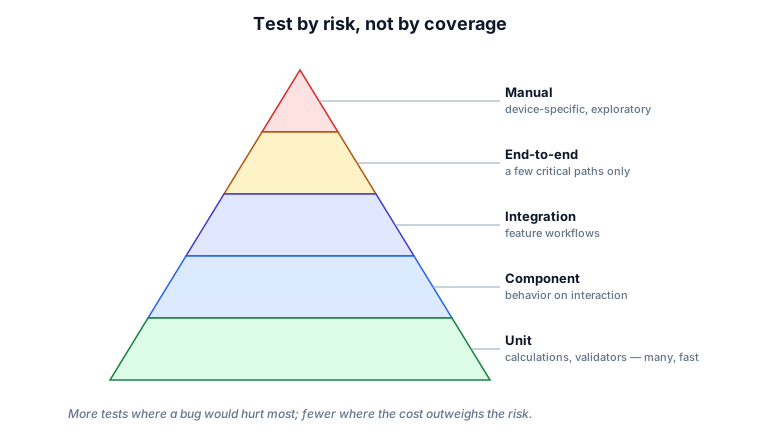
Each layer has a job, and at every level the aim is to test behavior:
- Unit — pure logic in isolation: calculations, validators, permission checks, state transitions. Many of these, and they're fast and cheap.
- Component — how a component behaves when a user interacts with it, not what its internal state is.
- Integration — a feature working across its components, hooks and services together.
- End-to-end — a handful of critical paths exercised through the whole app.
- Manual — the things you can't meaningfully automate, especially device-specific behavior.
The shape is deliberate: lots of cheap unit tests at the base, progressively fewer of the slower, higher-level tests, and manual reserved for what automation can't cover well.
What to unit-test — and what to skip
| Worth unit-testing | Not worth it |
|---|---|
| Financial and date calculations | Exact component markup / structure |
| Validation rules | Third-party library behavior |
| Permission and role logic | Trivial getters and setters |
| State transitions (e.g. onboarding readiness) | Implementation details users can't observe |
| Data transformations | Styling and layout (better checked manually) |
The pattern is that pure functions with clear inputs and outputs are ideal unit-test targets, while anything whose "correctness" is really just "it's wired the way I wrote it" is a waste — those tests break on every refactor and never catch a real bug.
Test behavior, not implementation
This is the rule that keeps a suite from becoming a liability. Tests coupled to internals — which piece of state changed, which props were passed, the exact DOM structure — fail every time you refactor, even when nothing a user cares about changed. They cost you maintenance and give you no real safety.
Testing Library pushes you the right way: you query the UI the way a user would (by role, label, or visible text) and interact with it as a user would, then assert on what the user can observe. A behavior test for one of Hunter Vault's rules looks like this — note it never reaches into state or props:
import { render, screen } from "@testing-library/react";
import userEvent from "@testing-library/user-event";
import { TransferForm } from "./TransferForm";

it("won't submit a transfer larger than the source balance", async () => {
  render(<TransferForm sourceBalance={100} />);
  await userEvent.type(screen.getByLabelText(/amount/i), "500");
  await userEvent.click(screen.getByRole("button", { name: /transfer/i }));
  expect(screen.getByText(/insufficient funds/i)).toBeInTheDocument();
});
If I later rewrite how that form manages its state, the test still passes — because it tests the rule, not the wiring.
Examples from a real app
Here's how the layers map onto Hunter Vault.
Unit is where the money lives. Balances, safe-to-spend, budget usage and savings-goal progress are all derived from the underlying records, which makes them pure functions — and pure functions are the easiest, highest-value things to unit-test. That the balance is derived rather than stored (a modeling decision I explain elsewhere) is exactly what makes it so testable. Hunter Vault runs 19 pure-logic test files in Vitest with no DOM setup — financial calculations, game mechanics (XP, rank tiers, streaks), sync planning and leaderboard scoring, none of it touching a component:
// src/app/lib/__tests__/financial-calculations.test.ts
import { describe, it, expect } from "vitest";
import { calcNetWorth } from "../financial-calculations";

describe("calcNetWorth", () => {
  it("returns assets minus debts", () => {
    expect(calcNetWorth(
      [{ balance: 50000 }],
      [{ balance: 10000, originalAmount: 15000 }]
    )).toBe(40000);
  });
  it("returns total assets when no debts", () => {
    expect(calcNetWorth([{ balance: 20000 }, { balance: 5000 }], [])).toBe(25000);
  });
});
Component tests are what I'd add next. Testing Library's approach — query by role, interact as a user would, assert on observable output — is what the TransferForm example above demonstrates. Hunter Vault doesn't have component tests wired up yet; the next priority would be the forms and screens that contain financial rules, since those sit closest to the high-risk logic that's already unit-tested.
Integration and e2e — Hunter Vault currently has no automated integration or e2e tests. The critical journeys (completing onboarding, restoring data from the cloud, a subscription unlocking features) are tested manually. Adding them would come after component coverage is solid — they're expensive to write and maintain, so the pure-logic foundation goes first.
Manual covers what automation can't do well — the device-specific behavior of the Capacitor mobile build, like keyboard handling and native feel on real iOS and Android hardware.
And because Hunter Vault is offline-first, a few scenarios deserve explicit tests that a server-first app wouldn't need: editing while offline, migrations running against old on-device data, and conflicting edits across devices. Those are covered in the offline-first write-up.
Tradeoffs and where over-testing hurts
Testing has a cost, and the cost of the wrong tests is high. A suite full of low-value tests slows the team down, and tests coupled to implementation make refactoring painful because every change turns the suite red for no real reason. Chasing 100% coverage optimizes exactly the wrong thing — it rewards testing trivial code and gives a false sense of safety. The goal is the most confidence for the least maintenance, which almost always means fewer, better-targeted tests rather than more.
My recommendation
Decide what to test by asking what would hurt most if it broke. Unit-test pure logic thoroughly — especially money math and permissions. Test components and workflows by behavior, querying and asserting the way a user experiences the app. Reserve end-to-end tests for a small set of critical paths, and manual-test the device-specific things you can't automate. Never assert implementation details, and never treat a coverage number as the goal. Confidence per test is the metric that matters.
FAQs
What should I unit-test in a React app?
Pure logic with clear inputs and outputs: calculations, validators, permission checks, state transitions and data transformations. Skip exact markup, third-party library behavior and trivial setters — those tests break on refactors and catch nothing.
Should I aim for 100% test coverage?
No. Coverage is a vanity metric that's easy to game and rewards testing trivial code. Test by risk instead — thorough tests on the things that would be costly to get wrong, light or no tests on the low-risk rest.
How do I test without coupling to implementation?
Query and interact with the UI the way a user does — by role, label or visible text — and assert on what's observable, using something like Testing Library. Avoid reaching into internal state, props or DOM structure, so your tests survive refactors.
What can't be unit-tested well?
Device-specific and native behavior — how the app feels on real iOS and Android hardware, keyboard handling, gestures. Those belong in manual and exploratory testing rather than an automated unit suite.
Want a React codebase you can refactor without fear? See how I help teams design and build production React applications →
Related: how I test complex React forms · building an offline-first React app with Dexie · the React hub