
The short version: with Capacitor, one React codebase becomes a web app, an iOS app and an Android app, because Capacitor wraps your existing web build in a native shell and gives it access to native device features through plugins. That's how I shipped Hunter Vault — an offline-first personal finance app — to both the App Store and Google Play from a single React project, without rewriting the UI for each platform.
This article covers how that actually works, how the project and native builds are structured, the rough edges you deal with when a web UI runs as a native app, and — honestly — when I'd reach for React Native instead. The goal isn't to sell Capacitor; it's to show when it's the right tool and what shipping with it really involves.
Quick summary
- Capacitor wraps your web build in a native WebView and exposes native APIs via plugins.
- You keep one React codebase and your web skills; you don't rewrite the UI natively.
- The web assets ship direct to the web and, via Capacitor, become native iOS and Android apps.
- You build and sign in Xcode and Android Studio, and submit through the normal store review.
- Expect platform rough edges — keyboard, safe areas, the Android back button, WebView differences, low-end performance.
- Choose React Native instead when you need heavy native UI or performance a WebView can't give.
Why Capacitor over React Native, for this app
The core difference is what you reuse. React Native renders your UI with native components, so you build (or rebuild) the interface in RN's world. Capacitor takes the web app you already have, runs it in a native WebView, and bridges to native features through plugins — so your React components, styles and logic come along unchanged.
For Hunter Vault that made Capacitor the obvious choice. It was already a React web app; it's fundamentally a data-and-UI app rather than one built around native-heavy interactions; and the goal was to reach both stores quickly from one codebase. Capacitor let me ship the same app to web, iOS and Android and keep improving it in one place. Rewriting the UI in React Native would have bought little for this particular app and cost a lot. That decision goes the other way for different apps, which I'll get to — and I compare the two in depth in React Native vs Capacitor.
One codebase, three targets
Here's the shape of it:
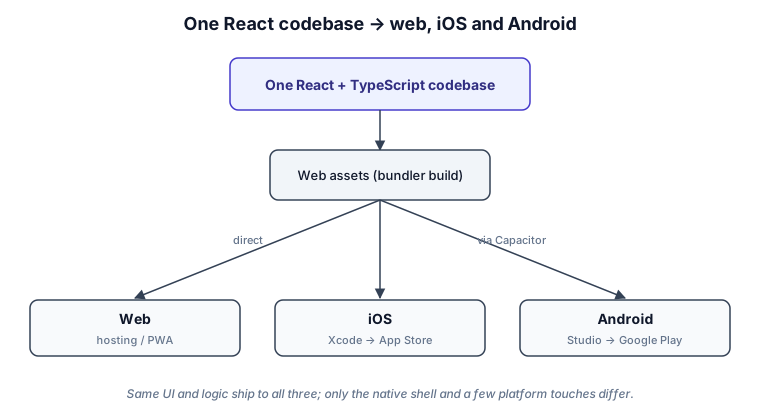
Your React app builds to web assets the way it always has — in Hunter Vault's case, Vite. Capacitor adds native iOS and Android projects that load those assets in a WebView, and a sync step copies your latest build (and any plugins) into those native projects. From there you open each one in its native IDE — Xcode for iOS, Android Studio for Android — to build, sign and submit. The web deployment uses the very same assets. The UI and business logic are shared across all three; only the native shell and a handful of platform touches differ.
Project structure and native builds
The main structural rule is to keep native concerns isolated so they don't bleed into shared code. The generated ios/ and android/ projects live alongside your src/, and platform-specific bits (a native plugin call here, a platform check there) are kept at the edges rather than scattered through feature code — the same feature-based architecture I use everywhere else applies.
The day-to-day build flow is: build the web app, run Capacitor's sync to push that build into the native projects, then build and sign in Xcode or Android Studio. Native capabilities come through plugins — for example, subscriptions in Hunter Vault run through RevenueCat, which provides the native billing integration behind a JavaScript API, so the React side calls into it without touching Swift or Kotlin.
The rough edges you handle
Running a web UI as a native app is mostly smooth, but a few things need explicit attention. These are the standard ones — the fixes are well-trodden:
- The on-screen keyboard covering inputs. On mobile the keyboard slides over your layout, so focused fields can end up hidden. You handle this with viewport/keyboard configuration and by scrolling the focused field into view.
- Safe areas and notches. Content has to avoid the notch, status bar and home indicator. That's
env(safe-area-inset-*)in CSS plus aviewport-fit=coverviewport. - Status bar styling. The native status bar's colour and style are set through a plugin so it matches your app rather than clashing with it.
- The Android hardware back button. It isn't a browser back button — you handle it explicitly so it navigates within the app (or exits) the way users expect.
- Native feel. Small touches like haptics on key interactions make a web UI feel like an app rather than a website in a frame.
- WebView differences. iOS uses WKWebView and Android uses a Chromium-based WebView whose version varies by device, so behaviour isn't identical across platforms and you test on both.
- Performance on low-end Android. The WebView isn't as fast as native rendering, and it shows most on cheaper Android hardware — heavy lists and animations are where you feel it, which is where the performance work (virtualization especially) pays off.
Three of these needed more than a standard fix in Hunter Vault:
Two separate iOS keyboard bugs. The first is well-known: Safari zooms the viewport when you tap any input smaller than 16px, so every input, textarea and select gets font-size: 16px !important globally in CSS. The second is less obvious: WebKit applies a dark overlay to focused inputs that overrides the app's own dark theme. The color CSS property doesn't fix it, because WebKit's focus overlay respects -webkit-text-fill-color instead — so the fix is background-color: #1A1F2E !important plus -webkit-text-fill-color: #E2E8F0 !important on focus.
The WKWebView blank screen. After updates or returning from background, WKWebView sometimes renders a permanently blank white screen. There are two variants. The post-update blank: stale cached JS is served against new native code, so on every launch the app version is compared against what's in localStorage — on mismatch it reloads. The resume blank: WKWebView simply fails to repaint after backgrounding. The fix is a repaint nudge: set html.style.opacity = "0.9999", force a layout flush via void html.offsetHeight, then clear the opacity. display: none was tried first and caused a worse permanent blank, so opacity is deliberate. An unconditional 8-second splash timeout guards against any variant of this producing a stuck startup.
The Android back button and the swipe gesture. Android's hardware back button does nothing in a Capacitor WebView by default — you wire it explicitly: at the root path it exits the app, anywhere else it calls navigate(-1) with a haptic. The iOS swipe-back gesture isn't exposed by Capacitor either, so it's reimplemented in JavaScript: a touch listener detects a swipe starting within 30px of the left edge, traveling ≥80px horizontally and <80px vertically, within 500ms — same result, same haptic.
Shipping to the App Store and Google Play
This is the part that surprises web developers, because it's pure native-platform process. For iOS you build in Xcode, upload to App Store Connect, typically test through TestFlight, and go through Apple's review. For Android you produce a signed app bundle, upload it to the Play Console, roll it out through testing tracks, and go through Google's review. Both stores review submissions, so you plan for review time rather than shipping on demand, and both require the usual native paperwork — signing, identifiers, store listings and privacy declarations. If you're selling subscriptions, they run through each store's billing, which is exactly what a layer like RevenueCat manages across both platforms.
When React Native would be the better choice
I'd reach for React Native (or fully native) when the app is built around things a WebView does poorly: heavy native UI, deep native integrations, demanding animations or graphics, or when a truly native look and feel is central to the product. Capacitor's sweet spot is the opposite — you have or want a web app, your UI is mostly standard, and reaching multiple platforms from one codebase matters more than squeezing out native-grade rendering. It's not that one is better; they're bets on different constraints, which is the whole subject of the comparison article.
Tradeoffs
Capacitor's costs are real: the WebView has a performance ceiling native rendering doesn't, some capabilities need a plugin (or writing one), you maintain two native toolchains, and you're subject to app review. Against that, you get one codebase, your existing web skills, a fast path to both stores, and shared logic across web and mobile. For an app like Hunter Vault the trade was clearly worth it; for an app that lives or dies on native performance, it wouldn't be. As with most architecture decisions, the point is to choose it deliberately.
FAQs
Is a Capacitor app a "real" app?
Yes. It's installable, distributed through the App Store and Google Play, and can use native device features through plugins. It runs your web UI inside a native shell rather than rendering with native UI components — but to a user it's a normal app.
Capacitor or React Native — which should I use?
Capacitor if you want to reuse a web app and your UI is mostly standard; React Native (or native) if the app needs heavy native UI or performance a WebView can't deliver. I go through the full decision in the dedicated comparison.
Does my offline-first data still work in the app?
Yes. IndexedDB works in the WebView, which is exactly how Hunter Vault stays offline-first on mobile — the local database and reactive queries behave the same as on the web. I cover that in building an offline-first React app with Dexie.
How do subscriptions work in a Capacitor app?
Through the stores' billing systems, accessed via a plugin. In Hunter Vault that's RevenueCat, which provides the native billing integration behind a JavaScript API so the React side stays platform-agnostic.
Want to take your React app to the App Store and Google Play? See how I help teams design and build production React and mobile applications →
Related: React Native vs Capacitor: how I choose · building an offline-first React app with Dexie · the React hub